Historical CBR Reporting
Historical credit bureau reporting was developed to help users to rerun a credit bureau report when the credit bureaus failed a file.
This simple process goes by the date your Metro contacts were marked done. Collect! reactivates Metro contacts for a particular report, recalculates debtors back to the selected date, runs the report again and recalculates debtors again so their financials are current. Rerun your credit reports once for each month you need to report again.
It is best to perform this procedure when you are signed in on the server. When Collect! recalculates accounts during this process, other users may be slowed down.
Done Date For A CBR Batch
You will need the Done Date of the Metro contacts for each of the credit reports you want to rerun.
 When you successfully complete a credit bureau report and mark the contacts as done, all the contacts reported in the report will have the same Done Date.
To confirm that there are Metro contacts for a particular date,
- Select Browse from the top menu bar and then select Contacts from the drop-down choices.
- When the list of contacts is displayed, press F6 to bring up the Edit Search Criteria form.
- Select YES for the item labeled Done. Select METRO for the item labeled Type. Enter the DONE DATE in the item labeled Done Date.
- Select the SEARCH button. Say YES to tag matching contacts.
This displays a list of contacts that confirms for you that there are contacts matching the Done Date you want to use for your historical reporting. Exit of Collect! and then sign back in to proceed with historical reporting.
 This may make a difference in the result file. The only reason they would not have been completed would be due to a problem with Credit Report Details or other needed data. Please refer to How To Run A Credit Bureau Report for more information.
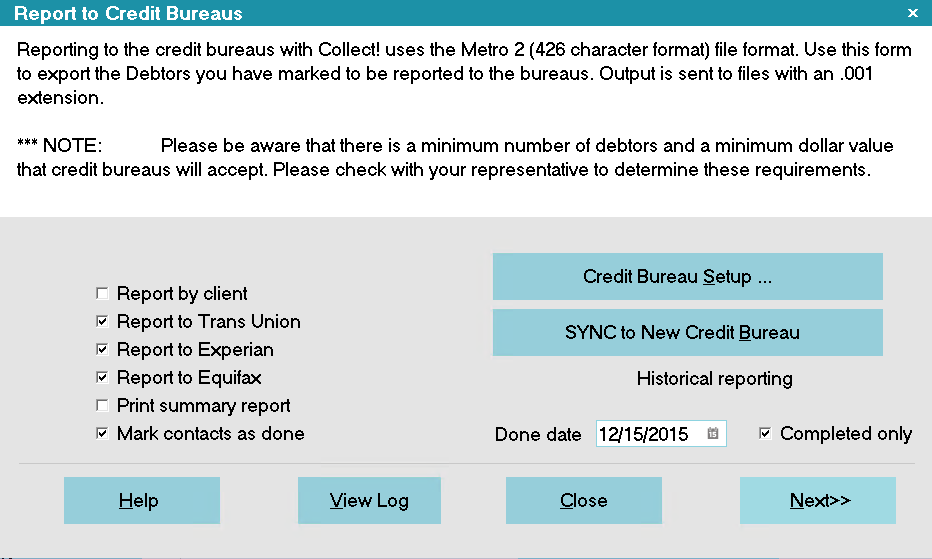
Settings for Historical CBR Reporting
Collect! creates a folder in the working database folder called CBR. There you will find credit bureau folders, that is, EQUIFAX, TRANS UNION and EXPERIAN. Under these folders are the DATED .001 files you send off to your vendor.
If you need to do more than one batch of reports, Be careful! These files are day date stamped and they will over write each other. After running each historical credit report for the vendors, you should rename these files before re-running the next month's report.
- Sign into Collect! and stop at the Main Menu.
- Run credit bureau reporting exactly as you normally do, each and every time, with the additional settings below.
- In the Report To Credit Bureaus form, in the field labeled Done Date, enter the done date for the first credit bureau report you want to rerun.
- Put a check mark in the field labeled Completed only
- Run the report to all three credit bureaus. Collect! will make three sets of files, placing them in the CBR folder created in your Collect! database folder.
- Repeat this procedure for each batch or report to be reproduced.
If you have other disks, this is a great way to compare results.
That is all there is to it. You are ready for your next credit bureau report.
Historical Reporting In Progress Contacts
If you do NOT switch ON Completed Only, in Step 2b above, Collect! will report Metros that are NOT marked done, PRIOR to the date you enter in the Done Date field. You can mark the contacts done after you complete the historical report. Switch ON Mark contacts as done and Collect! will prompt you to complete the contacts when the report is finished.