How To Understand Credit Bureau Reporting
Credit Bureau Reporting (CBR) allows you to send account information to credit bureaus in a standard format.
 WARNING: Credit reporting affects people's credit history and is not to be taken lightly. YOU ARE RESPONSIBLE FOR THE DATA YOU SEND. These instructions help you control the information you publish about a person's credit history. Instructions in no way replace thinking! Never send data if errors or warnings are displayed when publishing your credit report. Always verify the data that you think the bureau received by pulling credit reports on accounts you have reported. Do not assume!
Introduction
Collect! supports both credit grantors and third party collection agency credit reporting.
To understand Credit reporting, we can break it down into its constituent parts and look at the basic conditions that apply. This can help us understand and control our operations more effectively.
Accounts have a life. They start by being opened, they live a while, and then eventually they are closed. Hopefully, they are paid in full by then. Accounts live two simultaneous lives. They exist in the Collect! database and they can also exist in the credit bureau databases. You control the Credit Bureau Reporting (CBR) life of an account with the credit reporting controls in Collect!
 When you close an account in Collect! this does not remove any data from the credit bureau databases. You must specifically send a Close CBR status to the credit bureaus when you want to report an account paid in full or closed for any other reason.

Basic Credit Reporting Operation
The three states in the CBR life of an account are:
- Creation
- Existence
- Closure
Credit reporting information is sent to the credit bureaus periodically, typically at least once per month. You manually tell Collect! to generate the files for each bureau. When you create the CBR files, Collect! will check each account to help catch obvious errors in your data and will report any errors to you.
You create a CBR account when you first turn on CBR reporting on the account. The account must first exist in the Collect! database. Collect! uses the default CBR settings from the Credit Bureau Preferences screen to fill in the new account CBR settings. You can change the settings on an account by account basis to accurately reflect the information reported to the credit bureaus.
When you turn on CBR reporting on an account, Collect! transmits the CBR information with the next batch of data you send to the bureaus.
During its CBR life, you can control the status of the account to reflect the payment history. Depending on how Collect! and the account are configured, Collect! may also automatically set certain values for credit reporting. Collect! calls a special Check Metro Report function whenever the account balance is changed. This is described more fully below.
One very important piece of information is the 'Delinquency Date' on the debtor dialog. This affects a person's credit rating so use it carefully.
Once you send a 'Close' status to the bureaus, no further reports are transmitted by Collect!. Your credit ratings set the final payment rating of the account when you close the account.
 Several CBR status codes reflect closed accounts. Collect! ignores accounts with closed CBR status codes and does not transmit any further CBR data after an account has a CBR closed status. CBR status codes 13 and 61 - 65 are considered closed CBR accounts. Once a credit report is sent on one of these account status codes, Collect! will not send any more reports to the bureau on that account.
If the status code is not one of the closed types, then Collect! can automatically report your account information to the bureaus monthly or as needed.
Agents And Third Party Collectors
If you are a third party collector (you don't own the accounts yourself) you need to ensure the Credit Grantor switch is turned OFF in the Credit Bureau Preferences form.
Creating Collection Accounts
Upon creating the account, its CBR status should be initially set to status '93 - collection account'. The next CBR report you produce will contain any new accounts you created during the reporting period.
Working Collection Accounts
During the CBR life of the account, when something is changed on the account, Collect! recalculates the account total Owing and then calls the Check Metro Report function. The CBR status is set to 93 if the amount owing is $1.00 or more. If the owing is less than $1.00, the CBR status is set to '62 - paid in full collection account'.
The next CBR report you produce will contain any changes to your accounts.
CBR status codes other than 93 and 62 are not supported in Agent and Third Party operation.
Closing Collection Accounts
You can manually set the CBR status to close an account, or Collect! will automatically set the CBR status to '62 - paid in full collection account' when the account balance falls below $1.00. The next CBR report you send will contain the Closed status for the account and Collect! will not send any further credit reports on that account.
Credit Grantors
When you own the accounts yourself, you can track the whole life of the account. Your Company Details are reported in the K1 segment.
The Credit Grantor switch should be turned on in the Credit Bureau Preferences form.
A perfect account would start as status '11 - current account' and close with status code '13 - paid in full' with nary a change in between. Sadly accounts don't always follow such an excellent payment history. Various CBR status codes are used to report the delinquency of an account.
Depending on the interest settings of an account, Collect! can help manage account CBR status reporting. Interest calculation modes are described below. Collect! manages account status for accounts with compound interest. Collect! sets the delinquency date on compound interest accounts whenever an account is 31 days or more overdue. Accounts that are not using compound interest can use other mechanisms to set delinquency dates.
Creating Credit Accounts
Upon creating the account, its CBR status should be initially set to status '11 - current account'. The next CBR report you produce will contain any new accounts you created during the reporting period.
Working Credit Accounts
During the CBR life of the account, when something is changed on the account, Collect! recalculates the account total Owing and then calls the Check Metro Report function.
The Check Metro Report function only changes CBR settings if the existing account status is one of 11, 71, 78, 80 and 82 - 84. Any status outside that range is considered manually set, and Collect! does not affect manually set CBR status codes.
Collect! sets the CBR status codes on managed accounts based on the delinquency date of the account. The status is set to Current account, 30, 60, 90,120, 150 and 180 Days delinquent.
Current Accounts
When a debtor makes payments on time, the Delinquency date should be clear, and all CBR status reports should reflect status '11 - Current account'.
Delinquent Accounts
The delinquency date in Collect! is used to determine account delinquency status.
For compound interest accounts with a fixed monthly payment amount, Collect! calculates the delinquency date. On other types of interest accounts, you can manually set the delinquency date, or you can use promise contacts or pending transactions to automatically calculate the delinquency date.
When you post a payment, Collect! checks the delinquency date and sets the account CBR status accordingly.
Closing Credit Accounts
When an account is paid in full (CBR status 13) the last CBR status before the close status was set is used to determine the Payment Rating of the account. If they had been late in paying and then, suddenly, paid the account off, then the payment rating will reflect the delinquency status before the final payment in full.
When an account that is CBR status '11 - current account' is closed or paid in full, it should have a payment rating of ' 0 ' to indicate the account was current when it was closed.
Only accounts with Amortized compound interest are automatically closed by Collect!
When you close an account with no interest or other manual types of interest, you will want to set the Payment Rating in the Credit Bureau form to accurately reflect the delinquency at the time you manually close the account.
No Interest
A No Interest account is considered by Collect! to be a revolving account, and the default CBR status code is '11 - Current account' unless a delinquency date is set. A zero balance results in a CBR status code 11.
A No Interest account is only considered closed to CBR if you manually set the account status to 13 or 61 - 65.
If the last CBR status was a 13 or 61 - 65 (any closed status) it ignores the account for CBR purposes as the account has been reported as closed to the bureaus.
When an account has one of the automated status codes, Collect! checks the account status and updates the CBR status code to reflect current account conditions as follows:
If the account does not have the delinquency date set, then the CBR status is set to '11 - Current Account'.
If the account has a delinquency date, then the CBR status code is set to 11, 71, 78, 80, 82, 83 or 84 depending on the number of days between the delinquency date and the date the file is being reviewed.
To automatically set delinquency date, create a promise type contact. The due date of the promise contact is the promise date on the debtor form. If the promise date is 31 days or more overdue, the delinquency date is calculated as promise date plus 31 days.
Simple Interest
A Simple Interest account is considered by Collect! to be a revolving account, and the default CBR status code is '11 - Current account' unless a delinquency date is set. A zero balance results in a CBR status code 11.
A Simple Interest account is only considered closed to CBR if you manually set the account status to 13 or 61 - 65.
If the last CBR status was a 13 or 61 - 65 (any closed status) it ignores the account for CBR purposes as the account has been reported as closed to the bureaus.
When an account has one of the automated status codes, Collect! checks the account status and updates the CBR status code to reflect current account conditions as follows:
If the account does not have the delinquency date set, then the CBR status is set to '11 - Current Account'.
If the account has a delinquency date then the CBR status code is set to 11, 71, 78, 80, 82, 83 or 84, depending on the number of days between the delinquency date and the date the file is being reviewed.
To automatically set delinquency date, create a promise type contact. The due date of the promise contact is the promise date on the debtor form. If the promise date is 31 days or more overdue, the delinquency date is calculated as promise date plus 31 days.
Revolving Compound Interest
A Revolving Compound Interest account is considered by Collect! to be a revolving account, and the default CBR status code is '11 - Current account' unless a delinquency date is set. A zero balance results in a CBR status code 11.
A Revolving Compound Interest account is only considered closed to CBR if you manually set the account status to 13 or 61 - 65.
If the last CBR status was a 13 or 61 - 65 (any closed status) it ignores the account for CBR purposes as the account has been reported as closed to the bureaus.
When an account has one of the automated status codes, Collect! checks the account status and updates the CBR status code to reflect current account conditions as follows:
If the account does not have the delinquency date set then the CBR status is set to '11 - Current Account'.
If the account has a delinquency date then the CBR status code is set to 11, 71, 78, 80, 82, 83 or 84, depending on the number of days between the delinquency date and the date the file is being reviewed.
To automatically set delinquency date, create a promise type contact. The due date of the promise contact is the promise date on the debtor form. If the promise date is 31 days or more overdue, the delinquency date is calculated as promise date plus 31 days.
Normal Amortized Loan
This is considered an open account by Collect!
The default CBR status code is '11 - Current account' unless a delinquency date is set. A zero balance results in a CBR status code 13.
If the last CBR status was a 13 or 61 - 65 (any closed status) Collect! ignores the account for CBR purposes as the account has been reported as closed to the bureaus.
When an account has one of the automated status codes, Collect! checks the account status and updates the CBR status code to reflect current account conditions as follows:
If the account does not have the delinquency date set then the CBR status is set to '11 - Current Account'.
If the account has a delinquency date then the CBR status code is set to 11, 71, 78, 80, 82, 83 or 84, depending on the number of days between the delinquency date and the date the file is being reviewed.
Delinquency date is set by the interest calculation routines.
Rule of 78 Amortized Loan
This is considered an open account by Collect!
The default CBR status code is '11 - Current account' unless a delinquency date is set. A zero balance results in a CBR status code 13.
If the last CBR status was a 13 or 61 - 65 (any closed status) Collect! ignores the account for CBR purposes as the account has been reported as closed to the bureaus.
When an account has one of the automated status codes, Collect! checks the account status and updates the CBR status code to reflect current account conditions as follows:
If the account does not have the delinquency date set then the CBR status is set to '11 - Current Account'.
If the account has a delinquency date then the CBR status code is set to 11, 71, 78, 80, 82, 83 or 84, depending on the number of days between the delinquency date and the date the file is being reviewed.
Delinquency date is set by the interest calculation routines.
All Status Codes
The following is a list of all CBR status codes.
05 - Account transferred to another office (Deprecated April 2022) 11 - Current account 13 - Paid in full 61 - Paid in full; voluntary surrender 62 - Paid in full; collection account or claim 63 - Paid in full; was a repossession 64 - Paid in full; was a charge off 65 - Paid in full; a foreclosure was started 71 - 30 days 78 - 60 days 80 - 90 days 82 - 120 days 83 - 150 days 84 - 180 days 88 - Filed with govt. for insured portion on balance on defaulted loan 89 - Deed received in lieu of foreclosure on a defaulted mortgage 93 - Seriously past due, and/or assigned to collections 94 - Foreclosure/credit grantor sold collateral to settle mortgage 95 - Voluntary surrender 96 - Merchandise taken back by grantor; may be a balance due 97 - Unpaid balance reported as a loss by credit grantor DA - Delete entire account from credit bureau
DF - Delete entire account due to confirmed fraud (fraud investigation completed)
Managed Status Codes - Third Party Collections
The following status codes are supported by Collect! in Agency/Third Party Collections mode.
62 - Paid in full collection account or claim 93 - Seriously past due/assigned to collections DA - Delete entire account from credit bureau
DF - Delete entire account due to confirmed fraud (fraud investigation completed)
Managed Status Codes - Credit Grantor
The following CBR status codes are managed by Collect! in Credit Grantor mode.
11 - Current account 13 - Paid in full 71 - 30 days 78 - 60 days 80 - 90 days 82 - 120 days 83 - 150 days 84 - 180 days
Closed Status Codes
Collect! ignores accounts with the following CBR status codes and considers the accounts closed for CBR reporting.
05 - Account transferred to another office (Deprecated April 2022) 13 - Paid in full 61 - Paid in full; voluntary surrender 62 - Paid in full; collection account or claim 63 - Paid in full; was a repossession 64 - Paid in full; was a charge off 65 - Paid in full; a foreclosure was started DA - Delete entire account from credit bureau
DF - Delete entire account due to confirmed fraud (fraud investigation completed)
Manual Status Codes - Credit Grantor
Collect! does not automatically change any credit reporting information on accounts with the following CBR status codes. If you set an account to any one of these CBR status codes, you must manually make changes to the account CBR status as needed. Collect! will not make any changes even when an account is paid in full!
88 - Filed with govt. for insured portion on balance on defaulted loan 89 - Deed received in lieu of foreclosure on a defaulted mortgage 93 - Seriously past due, and/or assigned to collections 94 - Foreclosure/credit grantor sold collateral to settle mortgage 95 - Voluntary surrender 96 - Merchandise taken back by grantor; may be a balance due 97 - Unpaid balance reported as a loss by credit grantor DA - Delete entire account from credit bureau DF - Delete entire account due to confirmed fraud (fraud investigation completed)
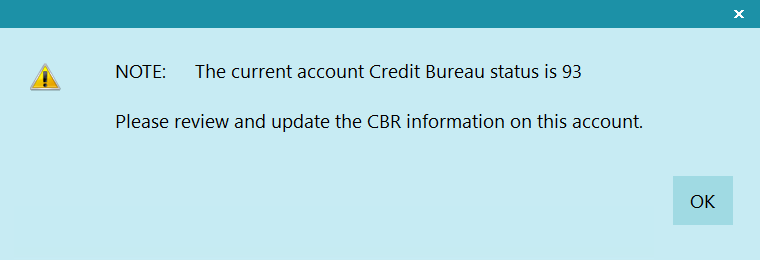
Paid Account in Full when Status was 93
Status Codes And Payment Ratings
| Status | Payment Rating |
|---|---|
| 11 | 0 |
| 71 | 1 |
| 78 | 2 |
| 80 | 3 |
| 82 | 4 |
| 83 | 5 |
| 84 | 6 |
| DEFAULT - Any payment rating manually set on the account. | |